
Credential Sending
A new employee does not have a company mailbox yet, so the first username and password have to reach a personal address. Credential Sending delivers them through a link that works once, for a few hours, and only with a PIN that IT gives to the person by voice. It works for any credentials, not only those of new employees.
Open it from Staff Management › Credential Sending. The SMTP of your tenant must be configured: the email is sent from there.
Sending credentials
- In the Send tab, fill in the fields below and click Send.
- The page shows the recipient and a six-digit PIN. Check the address, then tell the PIN to the person by voice. Do not send it by email: it cannot be shown again.
- Click Done. You move to the History tab, where the send is Pending.
| Field | Content |
|---|---|
| Recipient | One email address, usually the personal one. |
| Link validity | From 1 to 6 hours. |
| Username and Password | The credentials. Use a temporary password, with a required change at first sign-in. |
| Subject | The subject of the email. |
| Text | Your message, optional. Do not write the credentials here: the link is added automatically. |
The portal cannot check that a mailbox exists. If the address on the PIN screen is wrong, revoke the link from History and send again. Whoever receives the email by mistake still needs the PIN.
What the recipient does
- The email contains the Open credentials button, with the expiry of the link.
- The page asks for the PIN. After 3 wrong PINs the link stops working.
- The username and the hidden password appear, each with Copy. Show reveals the password.
- After 5 minutes the credentials disappear from the page, and the link cannot be opened again. If the person did not save them, IT sends new ones.
Opening the link does not use it up: only the correct PIN does. Mail security filters that follow links do not burn it. The recipient does not need an account on the portal.
How the credentials are protected
- Username and password are encrypted in the browser of the person who sends them. The portal stores only the encrypted text, and deletes it when the link is opened or expires.
- The PIN never reaches the portal, and the audit log records who sent what to whom, never the credentials.
- The password stays hidden on the page until the recipient asks to see it, and the credentials are left out when the page is printed.
A web page cannot prevent a screenshot or a photo of the screen. That is why the password should be temporary: once it is changed, a copy of it is useless.
History
The History tab lists every send, 30 per page, for 90 days. Use Search on recipient, subject and sender, and the Status filter.
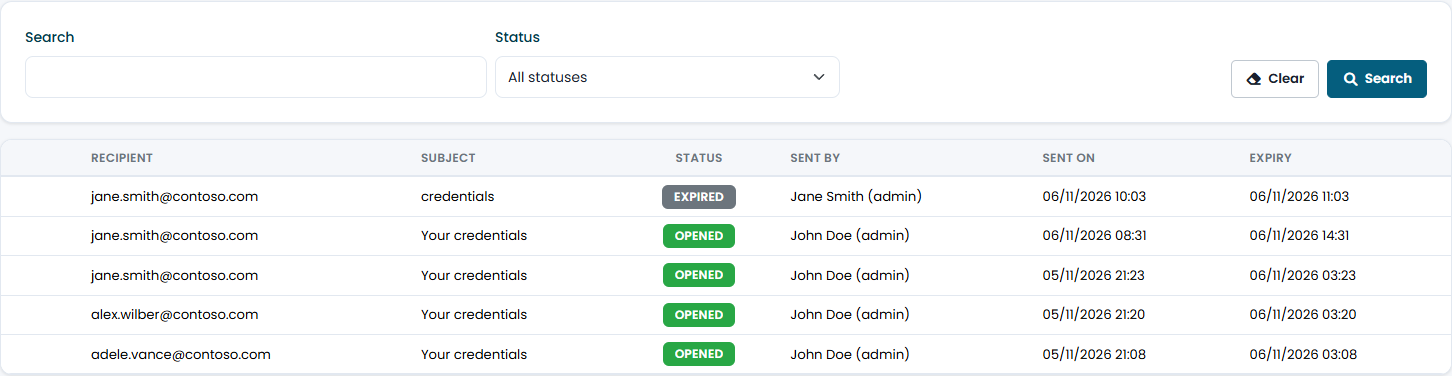
| Status | Meaning |
|---|---|
| Pending | The link can still be opened. Click the icon at the beginning of the row to revoke it. |
| Opened | The recipient entered the right PIN and saw the credentials. |
| Expired | The time ran out before the link was opened. |
| Burned | Three wrong PINs. |
| Revoked | IT closed the link. |
Limits and permissions
Each tenant can send up to 50 credentials per hour. Credential Sending requires the Credential Sending permission, and works only on your own tenant: it is not available to MSP users or when you are viewing another tenant.