
Query Explorer
Query Explorer is an interactive query interface built into CyberGuard Device Inventory Manager. It lets authorized users search, filter, and analyze device management data across all synchronized Intune entities — without writing SQL or navigating multiple portal screens.
What It Does
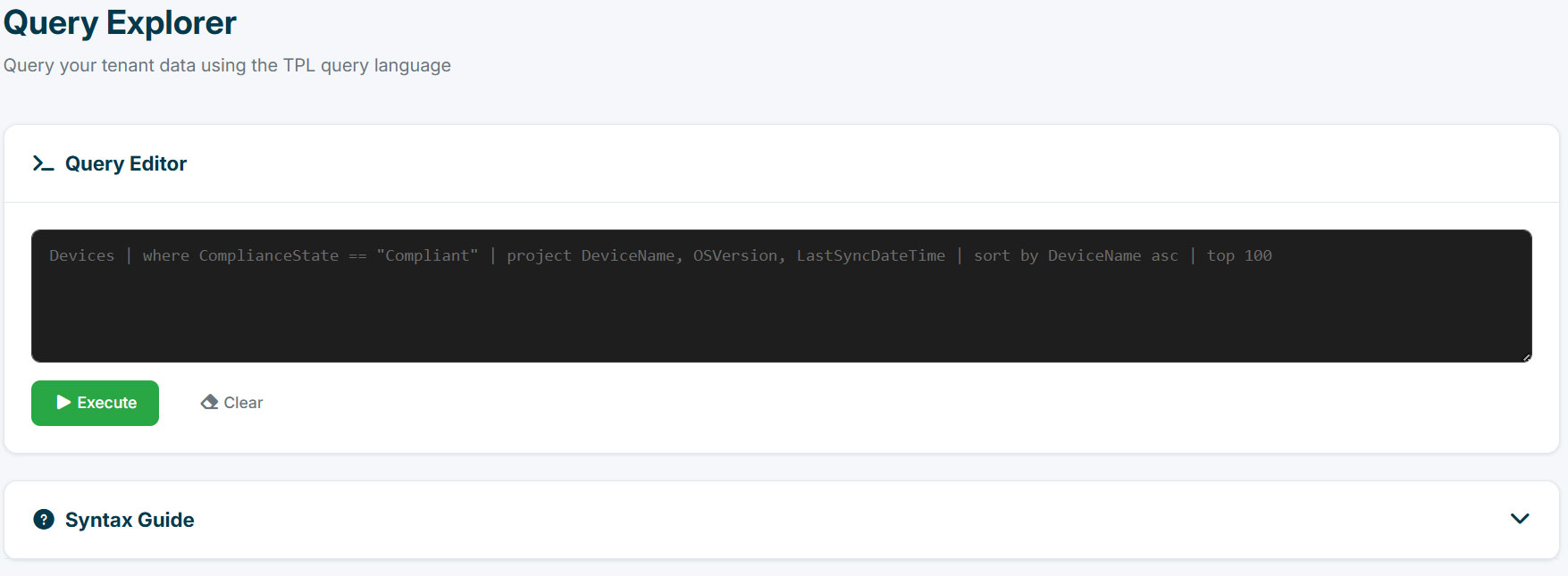
Query Explorer accepts a pipe-based query language (inspired by Kusto Query Language) and executes it in real time against your tenant's synchronized data. Results appear immediately in a paginated table, and can be exported to JSON or CSV in one click.
Typical use cases:
- Find all non-compliant Windows devices and extract their primary user UPN
- List devices with less than 10 GB of free disk space, sorted by available space
- Audit unsigned drivers across the fleet
- Review the last 50 operations recorded in the audit log
Query Explorer requires the Query Explorer permission (see Users & Permissions). You can query only the tables of the features included in your subscription, and only the devices you are allowed to see.
Query Language
Queries follow this structure:
TableName | command1 | command2 | ...
Each pipe (|) passes the result of the previous step into the next command. Commands are case-insensitive.
Commands
| Command | Syntax | Description |
|---|---|---|
where |
where Field operator "Value" |
Filter rows |
project |
project Col1, Col2 |
Select specific columns |
sort by |
sort by Field asc|desc |
Sort results |
top |
top N |
Limit to N rows (max 1000) |
Filter Operators
| Operator | Description | Example |
|---|---|---|
== |
Equal to | ComplianceState == "Compliant" |
!= |
Not equal to | Ownership != "Corporate" |
contains |
Contains substring | OSVersion contains "23H2" |
!contains |
Does not contain | DeviceName !contains "TEST" |
startswith |
Starts with | PrimaryUserUPN startswith "admin" |
endswith |
Ends with | DeviceName endswith "-LT" |
> < >= <= |
Numeric / date comparison | FreeStorageSpaceGB < "10" |
isnull |
Value is null | PrimaryUserUPN isnull |
isnotnull |
Value is not null | SerialNumber isnotnull |
Multiple conditions in a where clause are joined with and:
Devices | where ComplianceState == "NonCompliant" and OperatingSystem contains "Windows"
Available Tables
The tables below are available when the corresponding feature is part of your subscription. Each table shows the entity name to use in queries and the fields you can reference.
Devices
| Field | Description |
|---|---|
DeviceName |
Device display name |
Model |
Hardware model |
Manufacturer |
Hardware manufacturer |
SerialNumber |
Device serial number |
OperatingSystem |
OS family (e.g. Windows, macOS) |
OSVersion |
OS build version |
PhysicalMemoryGB |
RAM in GB |
CpuArchitecture |
CPU architecture |
CpuNome |
CPU model name (enriched) |
NpuPresente |
Whether an NPU is detected |
NpuNome |
NPU model name |
GpuNomi |
GPU model name(s) |
TotalStorageSpaceGB |
Total disk space in GB |
FreeStorageSpaceGB |
Free disk space in GB |
EthernetMacAddress |
Primary Ethernet MAC |
IsEncrypted |
BitLocker encryption status |
ComplianceState |
Intune compliance state |
ManagementState |
Intune management state |
DeviceType |
Device form factor |
Ownership |
Corporate / Personal |
LastSyncDateTime |
Last Intune sync |
EnrolledDateTime |
Enrollment date |
PrimaryUserUPN |
Primary user UPN |
PrimaryUserDisplayName |
Primary user display name |
Note:
CpuNome,NpuPresente,NpuNome, andGpuNomiare enriched fields computed from hardware assessment data. They can be returned viaprojectbut cannot be used inwherefilters orsort by.
Apps
| Field | Description |
|---|---|
AppName |
Application display name |
AppVersion |
Installed version |
AppPublisher |
Publisher name |
AppType |
App type (Win32, Store, etc.) |
InstallState |
Installation state |
Compliance
| Field | Description |
|---|---|
PolicyName |
Compliance policy name |
ComplianceStatus |
Overall compliance status |
EncryptionStatus |
Encryption check result |
BitLockerStatus |
BitLocker check result |
AntivirusStatus |
Antivirus check result |
FirewallStatus |
Firewall check result |
SecureBootStatus |
Secure Boot check result |
TpmStatus |
TPM check result |
WindowsUpdates
| Field | Description |
|---|---|
UpdateName |
Update display name |
KB |
KB article number |
Vendor |
Update vendor |
Categoria |
Update category |
Stato |
Installation state |
Fonte |
Update source |
Drivers
| Field | Description |
|---|---|
NomeDriver |
Driver display name |
Vendor |
Driver vendor |
NomeDevice |
Associated device name |
Classe |
Driver class |
Versione |
Driver version |
DataInstallazione |
Installation date |
Firmato |
Whether the driver is signed |
Stato |
Driver state |
ExtraDevices
Non-Intune devices imported manually (assets, rented equipment).
| Field | Description |
|---|---|
DeviceName |
Device name |
DeviceType |
Device type |
SerialNumber |
Serial number |
Manufacturer |
Manufacturer |
Model |
Model |
AssignedUserDisplayName |
Assigned user name |
AssignedUserUPN |
Assigned user UPN |
RentalCompany |
Rental company name |
AssetCode |
Internal asset code |
CreatedAt |
Record creation date |
SnmpDevices
Devices discovered by the network probe.
| Field | Description |
|---|---|
Hostname |
Device hostname |
IpAddress |
IP address |
MacAddress |
MAC address |
Site |
Network site |
Model |
Device model |
Manufacturer |
Manufacturer |
FirmwareVersion |
Firmware version |
SerialNumber |
Serial number |
SysDescription |
SNMP system description |
SysLocation |
SNMP system location |
LastScannedAtUtc |
Last SNMP scan timestamp |
Inventory
Non-hardware assets: software licences, SIM cards, subscriptions.
Category, sub-category and vendor are returned as names, not identifiers, so you can
filter on them directly. Status and CostPeriod are returned as their invariant English
values — the same ones used by the CSV import and export — so a query works the same way
whatever language the portal is displayed in.
| Field | Description |
|---|---|
Name |
Asset name |
Category |
Category name |
SubCategory |
Sub-category name |
Vendor |
Vendor name |
SerialNumber |
Serial number, licence key or ICCID |
PurchaseOrderNumber |
Purchase order number |
Status |
Active, Parked or Dismissed |
Cost |
Cost |
CostPeriod |
OneTime, Monthly or Yearly |
ExpiryDate |
Expiry or renewal date |
AssignedAt |
Assignment date |
AssignedUserDisplayName |
Assigned user name |
AssignedUserUPN |
Assigned user UPN |
AssignedUserEmail |
Assigned user email |
AssignedDeviceName |
Device the asset is bound to |
Company |
Owning company — the sub-company, or the parent company itself |
Notes |
Free-text notes |
CreatedByUserName |
Who created the record |
CreatedAt |
Record creation date |
UpdatedAt |
Last update date |
Examples:
Inventory | where Category == "SIM" | project Name, Vendor, AssignedUserDisplayName
Inventory | where Status == "Active" and ExpiryDate < "2026-12-31" | sort by ExpiryDate asc
Inventory | where AssignedUserUPN == "mario.rossi@contoso.it"
Inventory | where Company == "Contoso Manufacturing" | project Name, Category, Status
In an Enterprise tenant made of several companies, Company is always filled in — with the
sub-company name for assets that belong to one, and with the parent company name otherwise.
So you can single out one company, the parent included.
InventoryAssignments
Assignment history of inventory assets — who held what, and when.
| Field | Description |
|---|---|
ItemName |
Asset name |
Category |
Asset category |
Company |
Owning company |
OwnerDisplayName |
Assigned to |
OwnerUPN |
Assignee UPN |
OwnerEmail |
Assignee email |
PreviousOwnerDisplayName |
Previous assignee |
PreviousOwnerUPN |
Previous assignee UPN |
DeviceName |
Device assigned at that point |
PreviousDeviceName |
Previously assigned device |
ChangedAt |
When the assignment changed |
InventoryCatalog
The self-populating catalogue of categories, sub-categories and vendors.
This table has no Company column, unlike the other three: the catalogue belongs to the
tenant, not to a single company. Categories are shared by every company in the group.
| Field | Description |
|---|---|
Name |
Entry name |
Type |
Category, SubCategory or Vendor |
ParentCategory |
Parent category, for sub-categories only |
IsActive |
Whether the entry still appears in suggestions |
CreatedByUserName |
Who created the entry |
CreatedAt |
Creation date |
Useful to spot duplicates that crept in through imports:
InventoryCatalog | where Type == "Category" | sort by Name asc
InventoryCatalog | where IsActive == "false"
InventoryAttachments
Metadata of files attached to inventory assets — contracts, invoices, licence certificates. The storage path is deliberately not exposed.
| Field | Description |
|---|---|
ItemName |
Asset the file belongs to |
Category |
Asset category |
Company |
Owning company |
FileName |
File name |
AttachmentType |
Attachment type |
Description |
Description |
FileSizeBytes |
File size in bytes |
AlertDate |
Reminder date set on the attachment |
UploadedByUserName |
Who uploaded the file |
UploadedAt |
Upload date |
InventoryAttachments | where AlertDate < "2026-12-31" | sort by AlertDate asc
AuditLog
Always available, regardless of license tier.
| Field | Description |
|---|---|
Action |
Action performed |
EntityType |
Type of entity affected |
EntityId |
Entity identifier |
Details |
Action details |
IpAddress |
Client IP address |
CreatedAt |
Timestamp |