
Ports
Every open port is a door into a device. Some must be open, but many are left open by default, expose management interfaces in clear text, or use protocols and certificates that are no longer safe. The port analysis of the Network Assessment shows what each device exposes on the network and whether it is configured correctly.
How It Works
The network probe scans the open ports of the devices in your networks and analyzes the services behind them. Depending on the scan methods you enable, it:
- finds the open ports and recognizes the service behind each one (SMB, RDP, SSH, HTTP, HTTPS, NetBIOS and so on);
- reads the banner of the service to identify the product and its version;
- analyzes the web interfaces: the technologies they use and whether they are reachable in clear text;
- checks TLS: the protocol versions accepted, the certificate authority, and how many days are left before the certificate expires.
Reading the Results
The Top exposed ports chart shows the ports most frequently open in your networks, and the device list shows the exposed ports of each device.
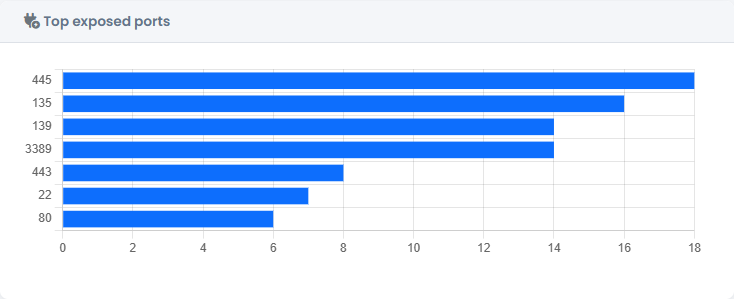
In the detail of a device, Exposed services lists each open port with the service, the product, the web technologies and a summary of the TLS configuration.

Findings turns what was found into problems to fix, each with a severity and a recommendation. For example:
- SMB exposed — port 445 open: an attack surface for lateral movement.
- NetBIOS exposed — ports 137-139 open: information disclosure and legacy surface.
- Unencrypted HTTP interface — a management interface reachable in clear text.
- Outdated TLS — protocols such as TLS 1.0 or 1.1 still accepted.
- Certificates that are expired, about to expire or issued by an unrecognized authority.

What to Do
- Close the ports that are not needed, starting from SMB, RDP and NetBIOS on devices that do not need them.
- Restrict the services that must stay open to the networks that need them.
- Move management interfaces to HTTPS and disable clear-text HTTP.
- Disable old TLS versions and renew certificates before they expire.
- Record what you did in the Workspace, in the Networking area, and check the result after the next scan.