
Scheduling
CyberGuard can run your assessments automatically, so that the Security Score always reflects the current state of your environment without anyone having to remember to start them. You configure it in Company Profile → Edit → Scheduling, a tab reserved to administrators.
How It Works
| Assessment | Who runs it at the scheduled time |
|---|---|
| Microsoft Entra | The CyberGuard portal itself, through the Microsoft Entra app. Nothing to install. |
| Microsoft 365 | The portal starts the collection through Microsoft Graph; right after, the Microsoft 365 probe completes it with Exchange, Defender, SharePoint, Teams, Purview and mailboxes. |
| Active Directory | The Active Directory probe. |
A probe is the agent installed as a Windows service on a machine of your organization: see Run as a Service. Without a probe, the Microsoft 365 and Active Directory assessments cannot run on a schedule.
Probes

The Probes card lists the probes installed in your environment: their scope (Microsoft 365 or Active Directory), the machine, its operating system, the agent version, when they were registered, their last contact and until when their access token is valid. A probe that stops contacting the portal is reported here and, if you want, by email.
Use the revoke button to disable a probe — for example if the machine is decommissioned or compromised. The probe stops working at its next contact; then uninstall it from the machine.
Scheduling an Assessment
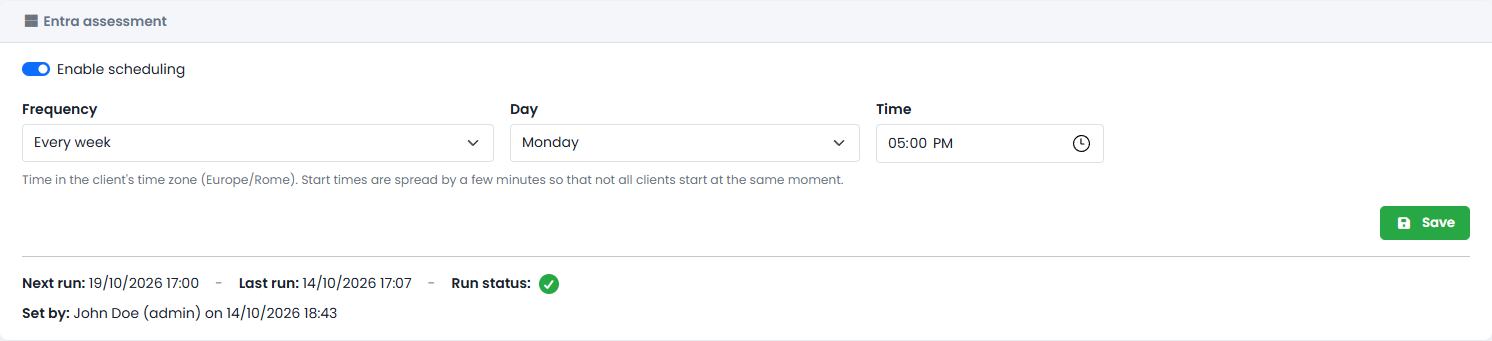
Each assessment has its own card:
- Turn on Enable scheduling.
- Choose the Frequency: every day, every N days, or every week on a given day.
- Choose the Time. Times are in your organization's time zone; start times are spread by a few minutes so that not all organizations start at the same moment.
- Click Save.
The card shows when the next run is due, when the last run happened and its result, and who set the schedule.
What to Expect
- An assessment started from the portal continues even if you close the page; the list updates by itself when it is done.
- If a scan is already running, a new request — manual or scheduled — is not queued: the portal tells you, and the scheduled run is skipped.
- Probes update themselves to the latest agent version.
- To be told when a scheduled assessment completes or fails, or when a probe stops responding, turn on the email notifications.