
Vulnerabilities
The Vulnerability Management tab of Microsoft Security View lists the software vulnerabilities that Microsoft Defender Vulnerability Management has found on your devices. To keep the list focused on what really matters, it shows only vulnerabilities with a public exploit — the ones attackers can use today — and excludes mobile devices.
Not all of them weigh the same: each CVE is matched against the CISA catalog of known exploited vulnerabilities (KEV), so the ones attackers are actively exploiting come first.
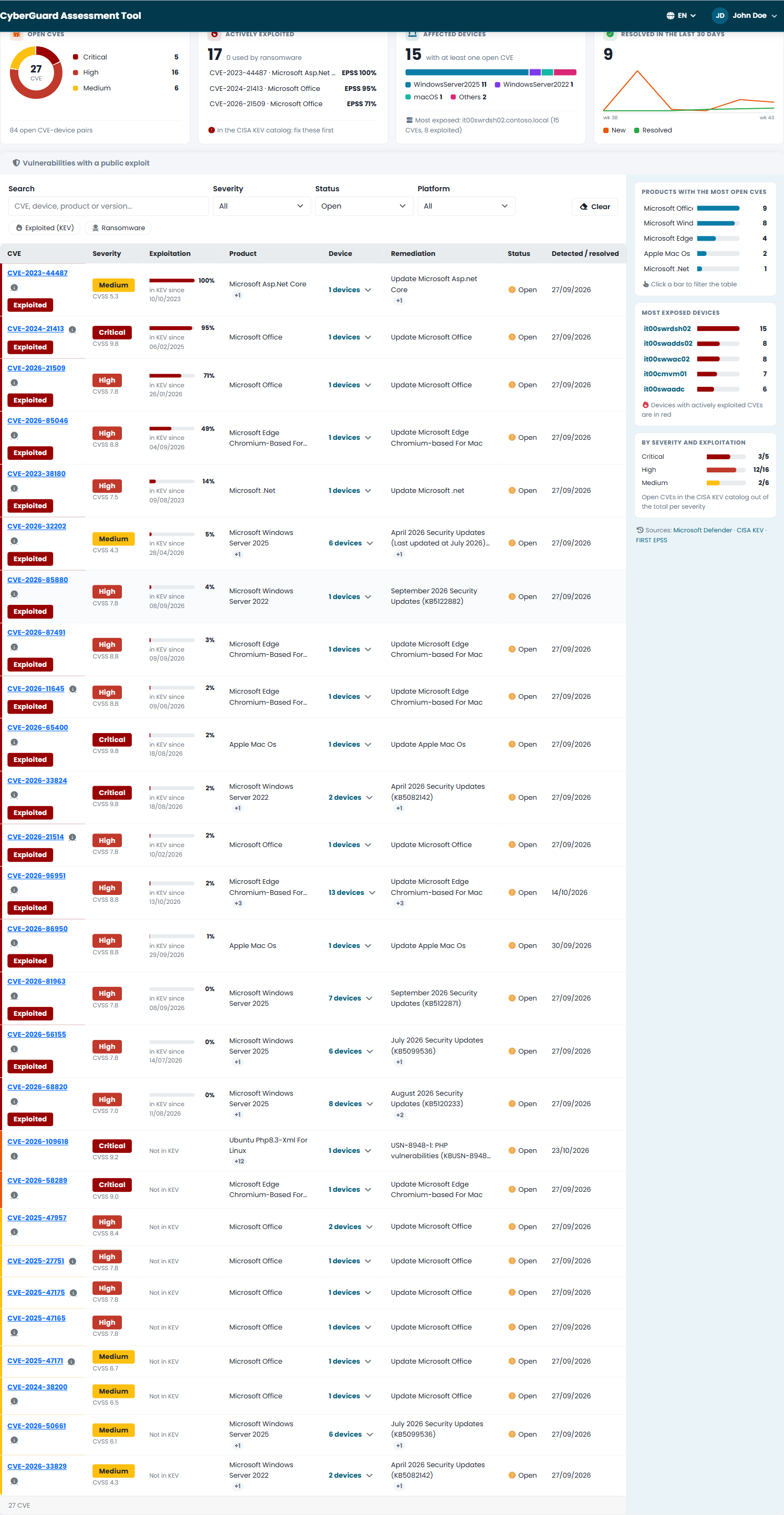
What You See
Four indicators summarize the situation:
| Indicator | What it shows |
|---|---|
| Open CVEs | The open vulnerabilities, by severity. |
| Actively exploited | The open CVEs in the CISA KEV catalog — fix these first — and how many of them are used by ransomware. |
| Affected devices | The devices with at least one open CVE, by platform, and the most exposed one. |
| Resolved in the last 30 days | The vulnerabilities resolved recently, week by week. |
The table has one row per CVE, sorted by priority: actively exploited first, then critical. For each CVE you see:
- the CVE and its severity with the CVSS score;
- the exploitation: Exploited and Ransomware badges, since when the CVE is in the KEV catalog, and the probability that it will be exploited in the next 30 days (EPSS);
- the affected product;
- the number of devices: click it to open the list of devices with platform, installed version and remediation;
- the remediation suggested by Microsoft, typically the security update to install;
- the status (open or resolved) and when it was detected or resolved.
Filter by text, severity, status and platform, or use the Exploited (KEV) and Ransomware quick filters. Next to the table, the charts By severity and exploitation, Products with the most open CVEs and Most exposed devices filter the list with one click.
The page shows when the data was last updated and when the next automatic update is scheduled; Refresh now updates it immediately. If the KEV catalog cannot be reached, the page says so and the exploitation column stays empty.
Using the List
- Start from the top: the actively exploited CVEs, and among them the ones used by ransomware.
- Then the critical ones, starting from the products and devices the charts show as most exposed.
- Group them by remediation: one security update often closes several CVEs on several devices.
- Apply the updates, then check the Resolved status after the next update of the data.
- Record what you did in the Workspace, in the Vulnerabilities area.