
What Changed
After you fix something, you want to know whether it worked — and whether something new has appeared in the meantime. The What changed tab of the Security Score compares two assessments of the same technology and tells you exactly that.
You find it in Security Score → What changed, with one sub-tab each for Active Directory, Microsoft Entra and Microsoft 365.
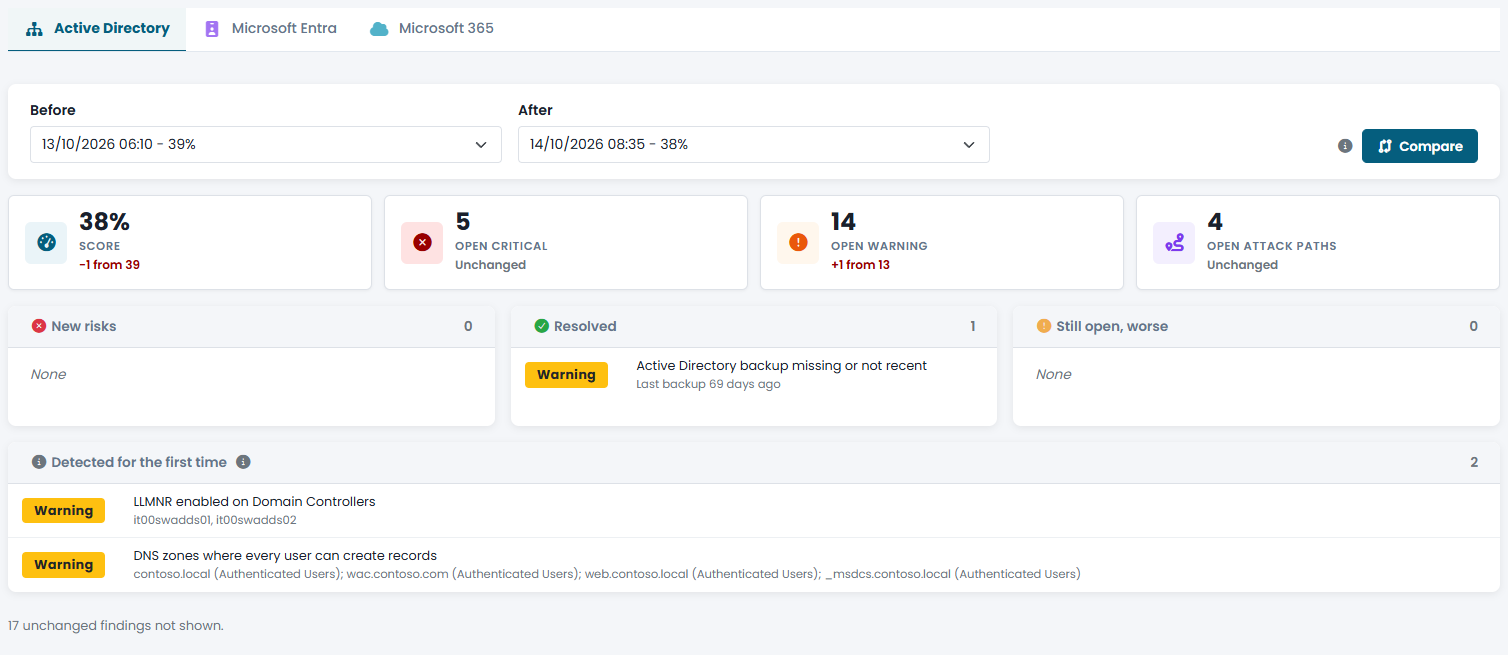
Choosing the Assessments
By default the tab compares the latest assessment with the previous one. To compare two other assessments — for example today's with the one you locked as a starting point months ago — choose them in Before and After and click Compare. Each assessment is listed with its date and score.
Reading the Comparison
The counters at the top show how the main numbers moved between the two assessments:
- Score — the score of the technology and its change.
- Open critical and Open warning — how many Critical and Warning findings are open.
- Open attack paths — how many attack paths are open.
Below, the findings that changed are grouped by what happened to them:
| Group | What it contains |
|---|---|
| New risks | Findings that were not there before. |
| Resolved | Findings that were there before and are now gone: the fixes that worked. |
| Still open, worse | Findings still open that involve more objects than before. A finding counts as worse only if it grows by at least 20% and by at least 5 items, so small fluctuations are ignored. |
| Detected for the first time | Findings from checks that did not exist in the older assessment, because the agent was updated in between. They are probably new checks, not new risks. |
Unchanged findings are not listed: the page only tells you how many there are.
Both assessments are evaluated with today's rules, so a change in the way CyberGuard scores a finding does not show up as a change in your environment.
Using the Comparison
- After a remediation — run a new assessment and check that the findings you worked on are under Resolved and that the attack paths you wanted to break are no longer open.
- In periodic reviews — compare the current assessment with the one of the previous review to report progress, and look at New risks to catch what changed in your environment in the meantime.