
CVE
Network devices — firewalls, switches, access points, NAS, printers — run a firmware that, like any software, can contain vulnerabilities. Unlike servers and PCs, they are rarely covered by an endpoint security product, and their firmware is often updated only when something breaks. The CVE analysis of the Network Assessment tells you which of your devices run a firmware with known vulnerabilities.
How It Works
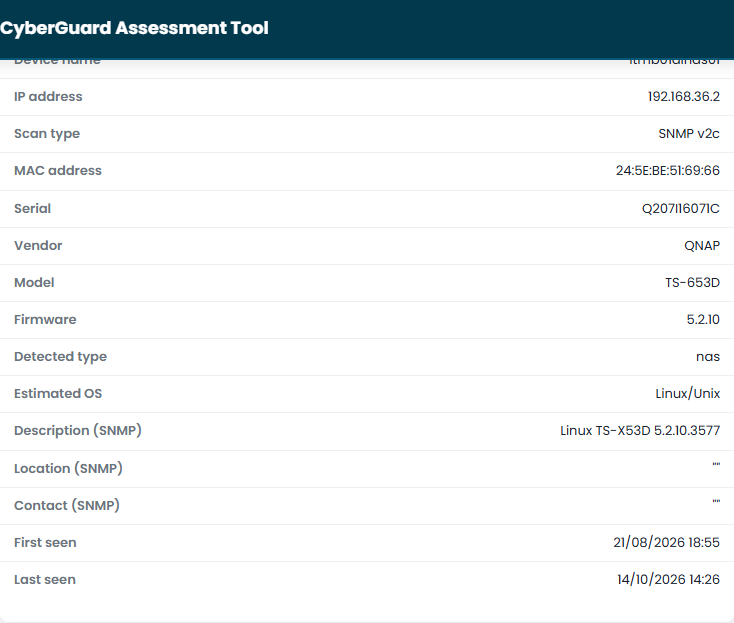
- The probe identifies the device. For devices that answer to SNMP, the network probe reads the vendor, the model and the firmware version. This is why SNMP credentials matter: without them the probe sees that a device exists, but not which firmware it runs.
- CyberGuard looks up the firmware. Vendor, product and version are searched in the National Vulnerability Database (NVD), the public catalogue of known vulnerabilities (CVE).
- Only the vulnerabilities that apply are kept. A CVE is associated with a device only if the device's firmware version falls in the range declared vulnerable. Vulnerabilities of other releases of the same product, and vulnerabilities not yet analyzed by NVD without a verifiable version range, are discarded.
- Every scan confirms the result. The lookup is repeated at every scan: after a firmware update, the vulnerabilities that no longer apply are no longer confirmed.
Reading the Results
In the device list, the CVE column shows how many known vulnerabilities affect each device, and the Risk column takes them into account. The CVEs by severity chart summarizes them for all your devices.

In the detail of a device, Known CVEs lists each vulnerability with:
- the CVE identifier, linked to its description;
- the CVSS score and the severity;
- the confidence of the match: how certain the association between the device and the vulnerability is;
- a summary of the vulnerability.
What to Do
- Start from the critical and high vulnerabilities with high confidence.
- Check on the vendor's site whether a newer firmware fixes them, and plan the update.
- If the device cannot be updated, reduce its exposure: limit who can reach it, disable the vulnerable services.
- Record what you did in the Workspace, in the Networking area, and check the firmware version shown for the device after the next scan.